Posts

Showing posts from August, 2017

How to Write a Program in SAP ABAP
Image
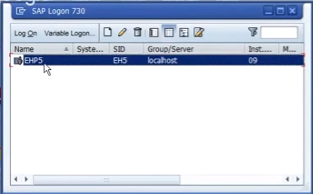
How to Write a Program in SAP ABAP Anybody who want to lean SAP and Going to learn  SAP Programming Language  must be know the what is SAP Program ,How it will be created in SAP System and What is the Language(ABAP) used to create SAP Application Programs. What is ABAP Programming Language in SAP? ABAP (Advanced Business Application Programming) ABAP is a  programming language  that runs in the SAP ABAP run time environment, created and used by SAP for the development of  application programs . ABAP is also called ABAP/4, The “4” in ABAP/4 stands for “Fourth Generation Language” . How to Start SAP ABAP   Different types of ABAP Programs Reports Module Pool Programming Interfaces Forms Data conversions User Exits & BADI All of R/3’s applications and even parts of its basis system were developed in ABAP. Steps to create SAP Program Log in to SAP System. Now give the User Name and Pass word. SAP Systems...

SAP ABAP Tutorial with Screenshots

SAP ABAP Tutorial with Screenshots These tutorials explained with screenshots for ABAP Language learning beginners, which are step by step tutorials to learn SAP ABAP Language easily. ABAP Programming Language Basics tutorials with screenshots ABAP Syntax ABAP Statements ABAP Program Types SAP ABAP Workbench Tools Data Dictionary Tutorials with Screenshots       Data Dictionary Overview     Tables     Domain     Data element     Views     Lock Objects     Types     Search Helps SAP ABAP Reports and ALV Tutorials         What is Internal Table ?    Events in Interactive Reports    ALV Reports    ALV Field Catalog in ABAP    Simple ALV Report Example    ABAP ALV Interactive Report SAP ABAP BDC Tutorials      BDC and LSMW    BDC Call Transaction Method Program in SAP ABAP...

BADI in SAP ABAP Step by Step

 BADI in SAP ABAP Step by Step BAdI Acronym of Business Add Ins As a customer outsider, it helps BAdI to improve SAP functionality.  Why is BADI? Unlike previous improvement methods, BADI continues the approach aimed at re-use objectives. BADI can be used in a number of times that these standard evaluation techniques can only be used once. For example, if you are upgrading a custom project, you can not map the extension on other custom projects. In order to overcome this disadvantage, SAP provided a new evaluation technique called BADI. Code of transaction for BADI definition: SE18 When you create a BAdI definition, you create a class interface automatically and you can define the methods in the interface. The application of the methods can be made in SE19 transactions. When created BAD, they are generated automatically: An interface with 'IF_EX_' is inserted between the first and second characters of the BAdi name Class classified as 'CL_EX_' inserted ...

What is BAPI in SAP ABAP with Example

What is BAPI in SAP ABAP with Example What is BAPI? The Business Application Programming Interface (BAPI) is a standardized programming interface (method) that allows external applications to access enterprise processes and R / 3 system data. BAPIs are defined in the Business Object repository (BOR) as SAP Business Object-type methods that perform certain business functions. They are implemented as RFC-compatible functional modules and are created in the ABAP Workbench function generator. Some BAPIs and methods provide basic functionality and can be used in most SAP business objects. These are called BAPI NORMALIZED. BAPIs for Mass Processing -ChangeMultiple(), CreateMultiple(), DeleteMultiple(). BAPIs for Reading Data - GetList() , GetDetail() , GetStatus() , ExistenceCheck(). BAPIs for Creating or Changing Data- Create() ,Change(),Delete() and Undelete() . They provide stable and standardized methods for perfect integration between the R / 3 system and external appl...

ABAP Code Inspector Tool

ABAP Code Inspector Tool The Code Inspector is a tool for checking static ABAP coding and DDIC objects . It helps developers to adhere to programming standards and guidelines by creating messages on less-than-optimal coding. The Code Inspector offers various possibilities to define object sets and to combine multiple single checks in so-called "check variants". Single object checks from the Development Workbench  You can check a single object with the Code Inspector from the ABAP Editor (transaction SE38), the Function Builder (transaction SE37), the Class Builder (transaction SE24), or the ABAP Data Dictionary (transaction SE11). To do this, choose <object> > Check > Code Inspector from the menu, where <object> can be a program, function module, class, or table. Checks on transport objects from the Transport Organizer  You can invoke the Code Inspector from within the Transport Organizer (transaction SE09) to check objects in a transport requ...