Posts

Showing posts from May, 2017

ALV Field Catalog in SAP ABAP

ALV Field Catalog in SAP ABAP Field Catalog Field catalog is an internal table which is used to pass a list of fields to display in ALV report, we can set different properties to fields that will be display in ALV output. Type Group It is a data dictionary object which contains all the reusable user-defined types. Example for a type group is SLIS, which contains all the user-defined types for developing ALV reports. TYPE-POOLS is a keyword which is used to assign the type-group to a ALV report . Syntax :  TYPE-POOLS SLIS .  DATA : <IT_FCAT> TYPE SLIS_T_FIELDCAT_ALV . "INTERNAL TABLE FOR FIELD CATALOG DATA : <WA_FCAT> TYPE SLIS_FIELDCAT_ALV  . " WORK AREA FOR FIELD CATLOG Field catalog types Field catalog: Field catalog is a format description of the display area. There are three procedures to build a FIELD CATALOG. 1. Automatic field catalog. 2. Semi-automatic field catalog. 3. Manual field catalog. Auto...
What are The Steps to Create ALV Interactive Report in SAP ABAP

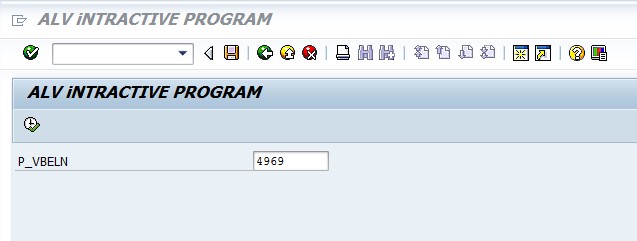
What are The Steps to Create ALV Interactive Report in SAP ABAP As a SAP ABAP Developer,our first and basic challenge is to create ALV Interactive Report .For that purpose ,I have covered steps to create Interactive ALV report with example Program.Let us start creating Report. Interactive ALV Report Steps 1.Select the Header and Item Tables. 2. create Structures of Both Tables. 3.Create the Selection Screen. 4.Select the Header Data. 5. Create Field Catalog for Header Structure. 7.Call the Function Module REUSE_ALV_GRID_DISPLAY. 8.Next create the USER_COMMAND Subroutine. 9.in which fetch the item details . 10.create Filed catalog for Item Table. 11.pass the table to REUSE_ALV_GRID_DISPLAY. 12.Pass the User_command event for export parameter of Function module. ALV Program REPORT  INTERACTIVE _ALV_REPORT     NO STANDARD PAGE HEADING     LINE-SIZE 500     MESSAGE-ID zz_8821. TYPE-POOLS: slis. TYPES: BEGI...

What is ABAP Debugger ? and How to Debug SAP ABAP Program

Image
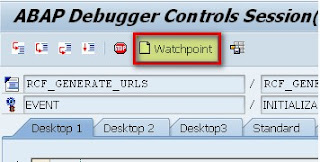
What is ABAP Debugger ? and How to Debug SAP ABAP Program ABAP Debugger is a programming tool which we can use to execute ABAP programs, by line or by section. Using ABAP Debugger ,we can check the flow logic of programs. There are two Types of Debugging are available: Classic Debugger New Debugger The Classic ABAP Debugger   displayed in the same window as the application which also has some restrictions. Some ABAP programs (such as conversion exist) cannot be analyzed in debug mode for technical reasons.  Classic Debugger Functions: Breakpoints Static Breakpoints Dynamic Breakpoints Breakpoints at Statements Breakpoints at Subroutines Breakpoints at Function Module Calls Breakpoints at Methods Breakpoints at System Exceptions Saving Breakpoints Managing Dynamic Breakpoints Watchpoints If you want to interrupt a program when the contents of a field or structure change, use a watchpoint.  You can set up to ...

Simple ALV Report Example for SAP ABAP Freshers

Image
Simple ALV Report  Example for SAP ABAP Freshers This is simple and sample  ALV report example useful for SAP ABAP learning students or freshers *&---------------------------------------------------------------------* *& Report  ZALV_INTERACTIVE_REPORT *& *&---------------------------------------------------------------------* *& *& *&---------------------------------------------------------------------* REPORT   ZALV_INTERACTIVE_REPORT . tYPE-POOLS : SLIS . TYPES :  BEGIN  OF  TY_VBAK ,         VBELN  TYPE  VBAK - VBELN ,         ERDAT  TYPE  VBAK - ERDAT ,         ERZET  TYPE  VBAK - ERZET ,         ERNAM  TYPE  VBAK - ERNAM ,        END  OF  TY_VBA...

NATIVE SQL and OPEN SQL in SAP ABAP

NATIVE SQL  and OPEN SQL in SAP ABAP Open SQL allows you to access the database tables declared in the ABAP dictionary regardless of the database platform that the R/3 system is using. Native SQL allows you to use database-specific SQL statements in an ABAP/4 program. This means that you can use database tables that are not administered by ABAP dictionary, and therefore integrate data that is not part of the R/3 system. Basic Open SQL Commands SELECT INSERT UPDATE MODIFY DELETE OPEN CURSOR, FETCH, CLOSE CURSOR Native SQL As already mentioned, Native SQL allows you to use database-specific SQL statements in an ABAP program. To use Native SQL statement, you must precede it with the EXEC SQL statement, and follow it with the ENDEXEC statement. Syntax EXEC SQL [PERFORMING <form>].   <Native SQL statement> ENDEXEC. ABAP Syntax The syntax of the ABAP programming language consists of ABAP statements and comments. ABAP Statements Normally, each ABAP ...

Control Statements and Logical Operators in SAP ABAP

Control Statements and Logical Operators in SAP ABAP Control Statements Following control statements can be used - - If ... EndIf Loop if [not] exp [ and / or [not] exp ]. ........ [elseif exp. .......] [else. .......] Endif. Case statement Case variable. when value1. ......... when value2. ......... [ when others. .........] Endcase. Do. While loop While <logical expression>. ..... ..... Endwhile. - Do loop Do <n> times. ..... ..... Enddo. Logical Operator A list of logical operators GE or >= GT or > LE or <= LT or < EQ or = NE or <>

Modularization in ABAP

Modularization in ABAP When you modularize source code, you place a sequence of ABAP statements in a module. Then, instead of placing all of the statements in your main program, you just call the module.When the program is generated, the source code in the modularization unit is treated as though it were actually physically present in the main program. SAP- ABAP Macro Include Programs Subroutines Function Modules Function Groups SAP- ABAP Macro If you want to reuse the same set of statements more than once in a program, you can include them in a macro. You can only use a macro within the program in which it is defined, and it can only be called in lines of the program following its definition. Macros  can be useful for long calculations or complex WRITE statements. Syntax DEFINE <macro_name> 'Macro Statements END-OF-DEFINITION Macros can use Parameters &N where N = 1,2,3... Example:- DATA: number1 TYPE I VALUE 1. DEFINE increment. ADD ...

Module Pool Programming Interview Questions and Answers in SAP ABAP

Module Pool Programming(Dialog Programming)  Interview Questions and Answers in SAP ABAP As an ABAP Consultant, you should be strong in Module pool programming techniques as well as when you face the real-time or fresher interview, Questions, and answers to test your talent to select for the interview. For that purpose, I am sharing my interview experiences in which I faced the most of the times on these topics that are at exit command, events difference between set screen and call screen difference between call screen and set screen in module pool,chain-end chain in module pool. What is the transaction code for the screen painter? SE51. What is the transaction code for Menu painter? SE41. What is the transaction code for the screen painter? SE93. What are the main components of dialog programs? Screens Module pools Subroutines Menus Transactions What is Screen flow Logic? The screen flow logic is like an ABAP program in that it serves ...

What are Field Symbols in SAP ABAP

What are Field Symbols in SAP ABAP Field Symbols  Field symbols and data references are used to access data objects dynamically in ABAP programs. without knowing the name attributes till run time ,using field symbols ,we can access and pass data objects. When we address a field symbol, the system works with the contents of the data object assigned to it, and not with the contents of the field symbol itself. Field symbols are placeholders or symbolic names for other fields. They do not physically reserve space for a field, but point to its contents. Whenever you address a field symbol in a program, you are addressing the field that is assigned to the field symbol. After successful assignment, there is no difference in ABAP whether you reference the field symbol or the field itself. You must assign a field to a field symbol before you can address it in a program. You can create field symbols either without or with type specifications. If you do not specify a type, the...