Posts

Showing posts from March, 2017

Web Dynpro ABAP Interview Questions
Image
Webdynpro ABAP Interview Questions The below webdynpro ABAP interview questions are very important for freshers and experienced ABAP developers .When you face the interview ,these questions most probably can be asked by interviewer so that prepare well theses questions ,be successful in interview. What is webdynpro ABAP? Web Dynpro for ABAP or Web Dynpro for ABAP (WD4A, WDA) is the SAP standard UI technology for developing Web applications in the ABAP environment. It consists of a runtime environment and a graphical development environment with special Web Dynpro tools that are integrated in the ABAP Workbench (SE80). Web Dynpro offers the following advantages for application developers: Stateful applications are supported The use of declarative and graphical tools significantly reduces the implementation effort. Web Dynpro supports a structured design process Strict separation between layout and business data Reuse and better maintainability by using c...

How to Create Editable Column ALV Report

Image
How to Create Editable Column ALV Report in Webdynpro ABAP. In the previous lesson ,we have learnt ,how to create simple webdynpro ALV report and now let us learn  creating editable column ALV report and what are steps to create and how can we create that report as editable input fields to make changes to ALV report cells. For this scenario ,first of all ,we have to create ALV reports so that we have already created in the last post. First Step: Instantiate the used component : Open the already created wddoinit method of ALV simple report and Go the code wizard symbol and instantiate used component that is ALV component through the F4 help. The system automatically creates the default code . Second Step: Call the method in the used controller: Select the radio button method call in used cotroller . Select the interface controller of ALV. Choose the method Get_model and continue. The following default code will be created  Third Step:...

Webdynpro ABAP ALV Report

Image
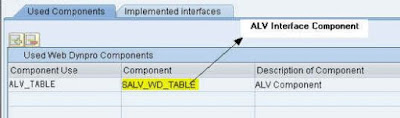
Webdynpro ABAP ALV Report Webdynpro ABAP ALV Report, is a first challenging thing for every new webdynpro developer to create components of webdynpro since ALV report creation is different from the ABAP applications so that From this lesson ,we will learn ,how to create simple ALV report using webdynpro component. 1.Go to SE80 transaction code and create the webdynpro component and assign it to your package and save it in local object. Now ,select the ZDEMO_ALV component for that add the standard SALV_WD_TABLE Table component in the Used Components section . Go to the context tab of componet controller and create context node and attributes Enter node name and select it from dictionary structure and enter your required node properties and select Add attributes from structure. Select the required fields of structure of EKPO.  Context node attributes will be created  Create the controller uasge in the properties tab of the V_main section. ...

SAP ABAP Dialog Programming

SAP ABAP Dialog Programming(Module Pool Programming) When we enter into any SAP Transaction code ,we will enter the data into screen fields and clicking on menu item and we will click on SAVE button .These interactions btween user and screen is calling the dailog programming Dialog program provides us  to navigate back and forth between screens Dialog programs are created with type as 'M' - Module Pool. They cannot be executed independently and must be attached to at least one transaction code in which you specify an initial screen. Dialog Program: With the help of  dialog program ,we can work interactively with the system and we can change the contents of the database tables. Each and every dialog program having  a certain sequence of screens which are processed by the system one after the other. Structure of Dialog Program Transaction code The transaction code starts a screen sequence. We are creating Transaction codes in  SE93 Tcode. A transaction...

Abstract Class and Interface in SAP ABAP

Abstract Class and Interface in SAP ABAP When the SAP world increasing ,It have to compete with other software packages .In that case ,Object oriented Programming is the most important language to increase the reuse ability of ABAP functions.Abstract classes and interfaces are also part of OO ABAP concepts .So every ABAP consultant Must be know clear basics of OOPs Concepts.Today ,we will discuss ,what is Abstract class and interfaces and difference between them. What is an Abstract Class? Abstract Class is also like a class but it has special features and it can’t be instantiated itself .It means we can't execute abstract class itself but we can execute it from the inherited classes that is we can use components(methods) of Abstract class in the inherited classes . Abstract class should at least contain one abstract method. Abstract methods are methods without any implementation – only a declaration. We can certainly define the variables referencing to Abstract class and ...

How to Display Data into Table in Webdynpro

How to Display Data into the Table in Webdynpro Here , we can display the data into table for the given input field that is according to user input ,the table will be filled with data.For this action ,we have to create one context node with input_node and table_node with their corresponding attributes .In the view layout ,create input field , button with onactiongo event method and table elements . Now let us see the coding part for the above scenario. INPUT_NODE is declared as an internal variable for the context node of the user input TABLE_NODE is declared as an internal variable for the context node of the result table CAR is declared as an internal variable of the user input FLIGHTS is declared as an internal table for the result representation Table. Attribute of the context node INPUT_NODE is read and passed to an internal variable of the method ONACTIONGO.  An internal table is filled according to the value of the internal variable. The context node...

how to Get SAP Certification

how to Get SAP Certification Why do I need SAP R/3 application consultant certification? Certification in SAP course increases Opportunities all over the World as well as in India.Certification Holders have first preference by the MNC Companies other than normal SAP Training Candidates.Even if getting the the SAP certifications is High Cost .It is better to do it. SAP offers consultants the opportunity to obtain recognition of their SAP System knowledge by taking a Certification Test. The certificate provides customers with assurance that the consultant has passed the SAP Project know-how, which is required to successfully implement SAP for customers. Certified SAP consultants are integrated in a tightly knit information network with SAP, yielding greater quality and more up-to-date knowledge to benefit customers SAP Certification Program: SAP offers more than 150 certifications, each targeted at some specific SAP product. You can explore SAP certifications on the ...

How to Implement SAP ABAP Implicit and Explicit Enhancement Options

Image
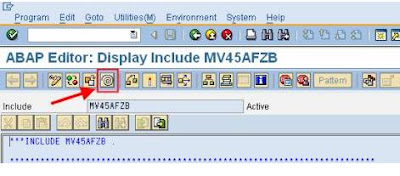
How to Implement SAP ABAP Implicit and Explicit Enhancement Options-ABAP Implicit and Explicit Enhancement options are most advanced than BADI 's and User and Customer exits. These techniques come into the picture to bring all enhancement techniques under one Enhancement Framework. These options are available since the SAP ECC 6.0 Version. These techniques are two types which are implicit and explicit options, which are used to add custom source code for standard SAP applications. The following are different enhancement technologies available under this framework. Source Code Enhancement Function Group Enhancement Class Enhancement Kernel-BADI Enhancement Here, an important one is Source Code Enhancement which is used to add external hooks(that are additional source code plug-ins)for SAP standard applications. There are two types of Source Code enhancement techniques. Implicit enhancement option Explicit enhancement option What are implicit and...