Posts

Showing posts with the label SAP Scripts

Ads

SAP ABAP SMARTFORMS

SAP ABAP SMARTFORMS Smart Forms in SAP ABAP. SAP Smart Forms is used to create and maintain forms for bulk printing on SAP systems. As an output medium, SAP Smart Forms supports a printer, fax, email, or the Internet (using the generated XML output). SAP introduced SmartForms in 1998 to overcome the limitations in SAP Scripts. What are SMARTFORMS in SAP ABAP Smart Form technology allows you to design print forms. ABAP programs need to "call them" for spools to be generated, ready to print. SMARTFORMS is the transaction for designing the smart form layout. It is possible to incorporate texts, images, tables, bar codes. The import parameters must be defined so that an ABAP program can send the data to be printed. When the smart form is activated, a function module is generated that an ABAP program must call. You should never assume the name of this function module because it can change on each system after the import. See below how to do it. Trans...
SAP ABAP Sapscripts Real time Interview Questions and Answers

SAP ABAP Sapscripts Real time Interview Questions and Answers These are Important SAP ABAP Sapscripts Interview Questions and answers useful for freshers and experienced. What is the meaning of a SAP Script and what is the role of it? SAP scripts are using to print the forms ,Ex:Purchase Order ,Invoice etc. What are Paragraph and Character Formats ? To format texts in forms, you need paragraph and character formats. What are Windows and Text Elements ? Forms usually consist of individual text areas (address, date, footer, and so on). To provide these areas with texts, you must define the areas first as output areas. SAPscript calls such an output area a window. Frequently used window names in application forms are ADDRESS, SENDER, MAIN, or PAGE. ou can create each window only once on each page, except the main window, which may appear up to 99 times on each page. Text Element Text elements in SAPscript are the individual text components of a form. In the differ...

How to Activate Debugger to Debug Sapscript in Different Ways

Image
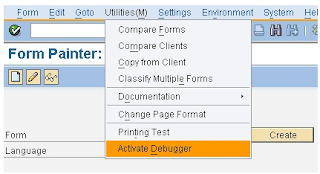
How to Activate Debugger to Debug Sapscript in Different Ways Don't you know ,how to debug sapscripts ?debugging sap script is not easy task as all executable Programs.to debug sapscript ,we have to activate debugger ,so in two different ways ,we can trigger the debugger in SAP ABAP Language . First way to debug sapscripts Step 1: Go to SE71 and Enter the script name. Then Go to Utilities > Active Debugger. Step 2: Then SAP script debugger will be activated like in the below image. Step 3: Now go to print program and execute it. Step 4: The debugger break point screen will appear and click OK. Step 5: Now ,Select the output device. Step 6: Now the debugging has been started line by line. We can see the work areas, variables are changing with its values. Step 7: We have single step, continue, execute options. Second way to debug sapscript Go to Transaction SE38. Enter the program name RST...

SAP ABAP Smartforms Interview Questions and Answers

SAP ABAP Smartforms Interview Questions and Answers What is smartform? Smart Forms are printing forms used to print Invoice and purchase order forms etc. We are calling smartforms from  ABAP programs then spools are generated, now smartform ready to be printed. SMARTFORMS is the transaction to design the smart form layout. SMARTSTYLES are used to define paragraph and character formats (fonts, barcodes, etc.) What are the differences between SAP Scripts and Smartforms? SAP Scripts are client dependent whereas Smartforms are client independent. SAP Scripts require a driver program to display the output whereas in smartforms the form routines can be written so that it is standalone. An Table Painter and Smartstyles to assist in building up the smartforms An integrated Form Builder helps to design Smartforms more easily than SAP Scripts It is possible to create a Smartform without a main window Function module is generated for Smartforms when we are...

Difference Between Scripts and Smartforms in SAP ABAP

Difference Between Scripts and Smart forms in SAP ABAP Present as you know all,SAP scripts are using hardly in Implementation projects ,instead of this ,they are using smart forms and adobe forms but scripts are used when upgrading projects or when enhancements are required so that some of the interviews ,you can face these interview questions that they might be ask differences between SAP Scripts and Smart forms. So now let us study them in detail. Multiple page formats are possible in Smart Forms which is not the case in Sap Scripts. It is possible to have a Smart Form without a main window. Labels cannot be created in Smart Forms. Routines can be written in Smart Forms tool. Smart Forms generates a function module when activated. script is client dependent one while smart form is client independent. In scripts we have to write print program while in smart forms it is not necessary. In scripts we can print background logo while in smart forms we cant pr...