Posts

Showing posts from February, 2017

SAP ABAP XI Testing Basis and BW modules

SAP ABAP XI, Testing , Basis and BW modules Today, we will learn some important modules XI,Testing,Basis and BW modules which are most demanded modules in SAP .If we learn these modules ,we will get good opportunities in SAP market.So here we will learn importance of these modules and how do we can benefit by learning these .Here ,i am going to explain you overview of these modules and their definitions and their importance in ABAP. Now let us know all modules one by one. SAP XI SAP Exchange Infrastructure(XI) or PI(Process Integration ) are used to build seamless integration between SAP  and Non-SAP applications within organisation and outside organisation. It can easily integrate with SAP products & components (RFC, IDOC, Proxy). Which provides data security for any SAP product. It consists the standards based - XML, XSD, Xpath etc It can have ability to communicate with other messaging systems/products. It manages the business Process Managem...
SAP OSS Notes

SAP OSS Notes  OSS (ONLINE SERVICE SUPPORT) notes in SAP contains the errors information and solutions and SAP provides OSS notes which contains solutions and descriptions that how to correct SAP applications using SAP OSS notes which are immediate supporting solution available on online to repair the known errors that faced in the ABAP workbench so that OSS notes are provided by the SAP service support. Read the SAP Note carefully before you use Note Assistant to implement it.OSS Notes are released by SAP to do the enhancements or modifications to the SAP Standard code. You can find the appropriate OSS Note as per your requirement from SAP Service Market Place, download it using transaction SNOTE in SAP and then apply it. OSS Notes are the enhancements or error corrections provided to the standard SAP Code... any missing features or customized requirements are provided by SAP through OSS Notes. Another benefit of SAP note assistant is that it automatically prompts you to i...

What is the Difference between BDC and LSMW

What is the Difference between BDC and LSMW in SAP ABAP For migrating data from Legacy system to SAP system in SAP ,we are using two ABAP tchniques which are LSMW( Legacy System Migration Workbench) and BDC(Batch Data Communication) .Both are data transfer methods from non-SAP to SAP system.ABAP developers using the BDC technique and Functional consultants using the LSMW technique .BDC can be done using recording or programming methods as well as LSMW can be done using step by step configuration of data .Using both methods ,we can import data from excel format and 'txt' format files.Now let us learn the one by one methods. What is LSMW( Legacy System Migration Workbech)? Now let us know what is the LSMW? ,is a Legacy System Migration workbench using which we can import the data from Non-SAP system to SAP system.It is specially designed for functional consultants who are not experts in the coding and it can be done in 14 steps to complete the LSMW for this we have t...

SAP ERP System

Image
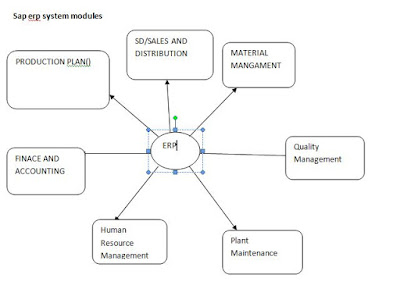
SAP ERP System SAP is one of the most demanded ERP technology in the world.It is (ERP)enterprise resource planning software is used to integrate the All SAP modules into SAP to develop ERP applications which are created by the SAP ABAP language to reach the customer needs.Here we will learn the SAP modules and Advantages and Disadvantages of SAP ERP system. SAP ERP is enterprise resource planning software developed by the German company SAP SE. SAP ERP includes the key business functions of an organization. The most recent Enhancement Package for SAP ERP 6.0 was released in 2016. SAP R/3, which was officially launched on 6 July 1992, consisted of various applications on top of SAP Basis, SAP's set of middle ware programs and tools. There are many SAP ERP vendors with a wide variety of functions and on-premises or cloud deployment options.ERP .Supporting ERP vendors have a variety of support models for ERP systems, depending on licensing contracts with customers.We ...

ABAP WebDynpro Input Help

How to Create Input Help in WebDynpro ABAP Input Help in WebDynpro ABAP,is 5th step duty of dynpro developer to create it.This is the most important topic in webdynpro components .What is the input help ,it is like a search help for user request in the screen field of any applications that is custom F4 help to display possible values for certain screen field .So to provide or creating input help for screen field in dynpro component .Ok now let us learn creating input help. We can reuse existing search helps from the ABAP dictionary.However ,there are not available search helps for all data types in the system.One way of creating Input Help is to include OVS (Object Value Selection ) value help,is implemented by system side effort.After enetering OVS value help for context attribute ,while the run time,The OVS component is then automatically triggered when a user presses the F4 button for a selected input field ,simultaneously ,Dialog box also created automatically on the...

How to Create Messages in WebDynpro ABAP

How to Create Messages in WebDynpro ABAP To trigger error ,warning and display messages in WebDynpro ABAP component ,is another important mandate for webdynpro consultants.In the previous lessons ,we have learnt reading attributes , structures and writing data to context elements  .The next step is learning triggering messages in components .This is very important lesson because , we must be learn the displaying message coding part to complete a dynpro component.For that i am sharing my knowledge here with you to develop message part. For this ,first of all , we have to integrate messages message log using the message manager.Next message manager is integrated into webdynpro code wizard. First of all, we have to get message manger . DATA:L_current_controller type ref to IF_WD_CONTROLLER, L_message_manager type ref to IF_WD_MESSAGE_MANAGER. L_CURRENT_CONTROLLER?=WD_THIS->WD_GET_API(). CALL METHOD L_CURRENT_CONTROLLER->GET_MESSAGE_MANAGER. MESSAGE_MANA...

How to Write Data to Context Elements in ABAP WebDynpro

How to Write Data to Context Elements in ABAP WebDynpro In the previous lessons ,we have learnt reading attribute and structure values from context element .Now we will learn how to write data to context element in ABAP WebDynpro .Reading and Writing data to context elements is very important part for every webdynpro developer because if you know these two techniques ,you can simply build any webdynpro application .Here i am sharing two different methods that writing data to existing context elements and new context elements and how to generate new context element there after setting the values for generated element. Writing data to Existing Context elements Method ABAP_TUTOR9. DATA:I_node type ref to IF_WD_CONTEXT_NODE,            I_my_struc type ref to IF_MY_CONTROLLER=>element_node_1. I_node = wd_context->get_child_node(wd_this->wdctx_node_1). I_node->s et_static_attributes(static_attributes= I_my_struc ). Endmethod. ...

How to Read Structure from Context Element in ABAP Webdynpro

How to Read Structure from Context Element in ABAP Webdynpro In the previous ,we have learnt reading attribute value of context element ,in this lesson,we will learn how to read structure from context element .It is most important as a ABAP WebDynpro developer ,second step is to learn reading structure static attributes ,reading the structure of any element and reading specific element of node .So now let us start learning method structures to access values. In the first step,we will learn reading static attributes of structure. Method ABAP_TUTOR. DATA:I_node type ref to IF_WD_CONTEXT_NODE,      I_my_struc type ref to IF_MY_CONTROLLER=>element_node_1. I_node = wd_context->get_child_node(wd_this->wdctx_node_1). I_node->get_static_atributes(importing static_attributes= i_my_struc). Endmethod. In the second step,we can also read a structure of any element using the index parameter. Method ABAP_TUTOR2. DATA:I_node type ref to IF_WD_CO...

How to Read Attribute Value of a Context Element in WebDynpro ABAP

Reading  Attribute Value of a Context Element in ABAP WebDynpro  In this post,we will learn how to read attribute value of context element in WebDynpro ABAP.It is important that after learning reference variables in webdynpro ,the next important step to learn what is node and element and attribute which are basic elements in webdynpro .So now let us know the get access the element of 'wd' component . Every webdynpro component contains the root node and child nodes .Child nodes contains the Attributes and attributes are elements of node and every element contains set of values that are string values .So in webdynpro we have to access the final value of node.For this ,we have to create reference variables for nodes ,elements and storing values. The easiest way to read attribute value of 'lead selection of the element of a node. Method abaptutor. Data:I_node type refer to IF_WD_CONTEXT_NODE,          I_element type refer to IF_WD_CONTEXT_ELE...

Reference Variables in ABAP WebDynpro

Image
Reference Variables  in ABAP WebDynpro Reference variables or attributes or object references or instances ,all are same SAP ABAP WebDynpro .These are used as object references for current controller and interfaces and also used to access the root   node  .So here there are two different instances are available which are 'wd_this' and 'wd_context' and we learn the use of these two reference variables. WD_THIS is a reference variable or 'instance' for the current controller :IF_VIEW_NAME. WD_CONTEXT is a reference variable or instance for   'root context node':IF_WD_CONTEXT_NODE. Normally ,in webdynpro component,whenever a view has been created , view interface will be created by system (IF_VIEW_NAME) and object reference for this interface is 'WD_THIS'. Some interfaces related to  Node->IF_WD_CONTEXT_NODE. Parent Element->IF_WD_CONTEXT_ELEMENT. We are using WD_CONTEXT reference variable or object refer...

SAP ABAP ALV Reports

Different Types of SAP ABAP Classical and ALV Reports  As a SAP ABAP Developer, we must be know different types of  SAP  Classical Reports and  SAP  ALV Reports which are root to develop any SAP application. In the first learning stage of SAP ,we have to understand all reports types and their parameters and events and reports importance in SAP . Normally, there are several reports which are simple and interactive in which  classical are old reports types and ALV  are advanced reports types  which are used to fetch the data from Data Base and display that data in tabular format that means columns and rows based on given input parameters conditions. In ABAP, there are seven types of reports used in different SAP modules.  But as a ABAP developer, we need to know Classical and ALV reports. Classical Interactive Logical Database ABAP query ALV Reports (ALV stands for ABAP List Viewer) Report Writer/Report Painter Views Cl...

ABAP Coding Standards to Improve Quality of Programming

ABAP Coding Standards to Improve Quality of Programming In this post,i am sharing Coding Standards which every ABAP developer should learn to improve quality of programming performance .So Performance tuning which technically improves the fast execution of ABAP application .By following the coding standards ,we can write better programming which client need .Now let us learn the some coding tips or  coding guidelines in SAP ABAP. SE30 (Run time analysis):Use this tool to analyse the performance of ABAP program or any Transaction. SQL Trace (ST05):Use this tool to analyse the Data Base Calls made in Reports. Use the Code Inspector Tool to check static ABAP coding and DDIC objects. SAT transaction is the replacement of SE30 which provides Functions as SE30. ST12 is a combination of STO5 and SAT which is very powerful tool. Use where clause in your Select Statement to restrict the volume of data fetching. Design the query to use as ma...

SAP Projects Types

What are Types of  SAP Projects  In SAP ,to become a ABAP developer ,we need to understand SAP projects types and development process in each  project and role of ABAP consultant in that project .There are Four types of projects which are developed by functional and technical consultant together . 1. Implementation Project 2. Support Project 3. Upgrade Project 4. Roll out Project Now let us learn the about Each type of project. 1. Implementation Project: This project is started when client changes from his business environment from legacy system to SAP system .In this project ,data migration is started from legacy system to SAP system and also all needed modules integrated into project.Functional specification documents will be prepared.business blue print converts into SAP applications.Here on wards ABAP consultant will be starting. 2. Support Project: This project is started after SAP systems installed at the client place .Then client want ...

What is ASAP Methodology in SAP ABAP

Image
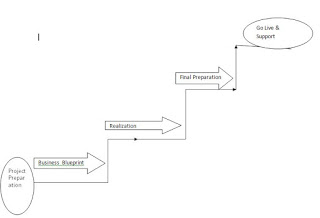
What is ASAP Methodology in SAP ABAP As a SAP ABAP developer,we should know what is ASAP Methodology and its phases  and ASAP methodology importance in the real time project .There are five steps in ASAP process which are used to build the SAP projects.Most of the times,as a real time ABAP consultant ,we will face questions in the real time interview. Five Phases are : 1.Project Preparation 2.Business blue print 3.Realization 4.Testing 5.Go Live & Support Project Preparation:   The first phase in ASAP is Project preparation.In this step ,the functional consultants will analyse the business process and define the system for SAP .They will decide the time line for the project.And also they will assess the man power required and How much budget will cost for the project. Blue Print Preparation :     This is second step in ASAP methodology.In this step ,the project preparation scenarios are finalized. Technical experts will prepare the blu...

SAP ABAP SD MM FICO Flow

SAP ABAP SD MM FICO Flow  To develop any SAP ABAP application,Every developer need to be know SD,MM and FICO flow .It is very important to know all SAP modules flows and their services .Then ABAP developer can understand technical aspect of SAP applications and when we are facing the real time interview ,we will face questions on some important module flows to crack the interview. SD Module Flow Inquiry:  Transactions: VA11,VA12 and VA13.                Tables:VBAK and VBAP. Quatation:  Transactions: VA21,VA22 and VA23.                Tables:VBAK and VBAP. Sales order:  Transactions: VA01,VA02 and VA03.                Tables:VBAK and VBAP. Delivery:  Transactions: VL01,VL02 and VL03.                Tables:LIKP and LIPS. Billing:  Transactions: VF01,VF02 and VF...

Performance Check and Analysis Tools for SAP ABAP Interview

Performance Check and Analysis Tools for SAP ABAP Interview Performance Tuning in SAP ABAP is required to write quality programs which reduces time consuming execution of SAP applications .To achieve this programming performance check ,there is available Analysis Tools which are used to check program performance .Tools are Run time analysis ,Performance trace ,Code Inspector ,Dump analysis and Extended program check .As a ABAP'r we should have well knowledge on all performance tools to face the real time SAP ABAP interview as experience consultant. 1.Run time Analysis (SE30) We use this tool to analyse the performance of ABAP programming .We use the results of the run time analysis to identify:           Run time-intensive statements.           To show the hierarchy of program calls.           Excessive or unnecessary use of modularization units.           CPU-i...