Posts

Showing posts from June, 2017

Where Can I Get SAP ABAP Tutorials for Beginners

Where Can I Get SAP ABAP Tutorials for Beginners SAP ABAP Tutorials is popular sentence searched by ABAP Beginners to learn SAP ABAP Language .But Did you get correct place to learn ABAP Tutorials with screenshots .Here everybody who is going to learn SAP ABAP  Little bit confused,where to start it and where to end it . As we all know ,there is a huge demand for ABAP language in world wide IT market and attractive packages and in short time ,you can get the job as well as we can learn ABAP in exact 90 days with planned tutorials. How to Start SAP ABAP Language as a Beginner ABAP Tutorials for Beginners As a Beginner ,you don't know ,how to learn SAP ABAP .first of learn what is SAP Programming Language and Advantages of it and disadvantages of that language and do you have really interest in SAP Program ,introspect yourself before taking the decision .Because ABAP also a Language like Java ,once you entered into this Language ,you have to learn more technical cod...
Step by Step Tutorial on Creating class in SAP ABAP Class Builder(SE24)

Image
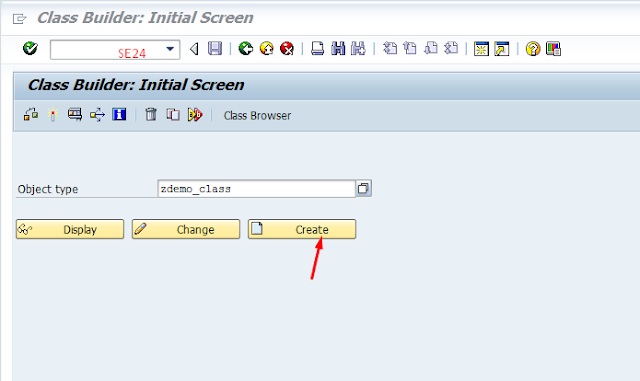
Step by Step Tutorial on Creating a class in SAP ABAP Class Builder(SE24) This Tutorial will explain to you, How to create a Class in the SAP ABAP and Class Methods and Class Attributes and defining source code in the Class Builder (SE24). Here learn About Class in Object-Oriented Programming . Go to SAP Easy Access Screen where enter the SE24(Class Builder) Transaction Code. Select the Radio button class and Click on the Continue Button. Select Public Instantiation and select the usual ABAP class radio button.  Save it as a Local Object. Click Methods Tab and define methods. Click on Attributes Tab and crate variables, types. Click on Save, Check and Activate. To implement methods, select method and click on code button where define source code. To view the source code, click the Source code based button. class ZDEMO_CLASS definition   public   final   create public . public section. *"* public components...

All about Classes in ABAP Object Oriented Programming

All about Classes in ABAP Object Oriented Programming Class describes real world Object that may be car ,home and Animal .In ABAP Object Oriented (OO)Programming ,Class concept is first and Fore most Topic ,so through this post ,we will learn class in ABAP and Types of class and How to create classes and Methods in SAP ABAP. Class consists the Properties and Attributes. Properties are Methods or Functions or Procedures. Attributes are Variables . One class can have Any number of Objects that is Object is like a class but object can never be a Class. Example :Car is a class ,Here class contains some common Properties for its related Objects.                 Object may be different companies like Ford Maruthi etc. Objects are instances of a class ,so for one class ,we can create many objects  Class Definition in SAP ABAP Class: we can build an Object properties using class. The attributes of objects are defin...

How to Understand ABAP Programming Syntax

Image
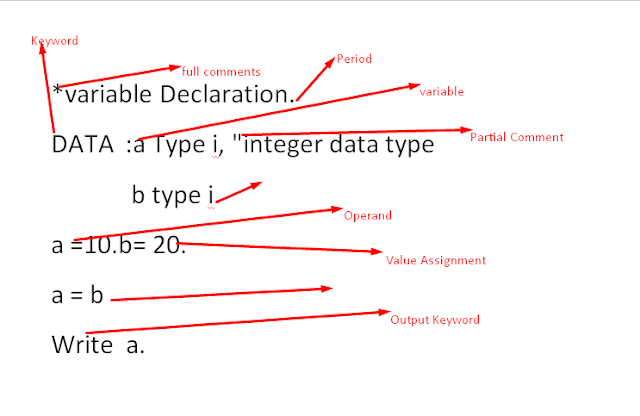
How to Understand ABAP Programming Syntax ABAP Syntax Contains Statements and Comments .Statements consists the keywords ,Operands and Additionals and ends with the Period .Comments in ABAP Programming are two types full comments and Partial Comments. ABAP Statements Normally, each ABAP statement begins with a keyword. A statement can contain operands and additions of the keyword and is always concluded with a period. Formatting ABAP Statements ABAP has no format restrictions. You can enter statements in any format, so a statement can be indented, you can write several statements on one line, or spread a single statement over several lines. You must separate words within a statement with at least one space. The system also interprets the end of line marker as a space.   Write 'test'. write 'test'. Call function FM     exporting  ------ Importing ----  . Chained Statements The ABAP programming language allow...

ABAP Programming Statements

ABAP Programming Statements ABAP Program is a Collection of statements and there are different types of Programming statements using in SAP ABAP Language. Here we are learning the different types of Statements in ABAP . Different types of statements in ABAP Program Declarative Statements These statements define data types or declare data objects which are used by the other statements in a program or routine. TYPES, DATA, TABLES Modularization Statements These statements define the processing blocks in an ABAP program. METHOD ... ENDMETHOD, FUNCTION ... ENDFUNCTION, MODULE ... ENDMODULE. Event keywords AT SELECTION SCREEN, START-OF-SELECTION, AT USER-COMMAND. Control Statements You use these statements to control the flow of an ABAP program within a processing block according to certain conditions. IF, WHILE, CASE Call Statements You use these statements to call processing blocks that you have already defined using modular...

ABAP Programming Types

ABAP Programming Types  In SAP,each ABAP Program has the Type ,based on the Program Type ,we can understand what is that kind of program.There are 8 programming Types . When a program is created, the suitable statement is automatically generated by the ABAP Workbench and should be changed during editing in the additions only.  In particular, the keywords FUNCTION-POOL, CLASS-POOL, INTERFACE-POOL, and TYPE-POOL should be created solely by the respective tools of the ABAP Workbench and never be entered in the source text themselves in order to avoid unexpected system behavior. REPORT   Report Type Program is Executable. Module Pool Module Type is a Executable PROGRAM FUNCTION-POOL The introductory statement FUNCTION-POOL declares a program in which you can define function modules. Class Pool The introductory program statements CLASS-POOL and INTERFACE-POOL are provided solely for class and interface definitions. Subroutine...

How to Design Selection Screen in SAP ABAP

Image
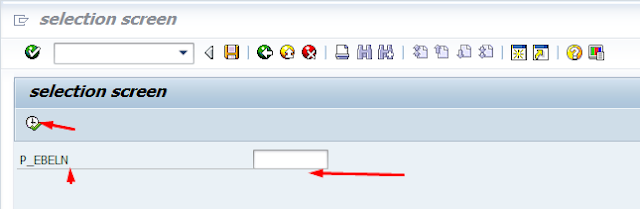
How to Design Selection Screen in SAP ABAP In SAP ,we are using the selection screen to create input screen for the ABAP Programs ,End user enter the the input values in selection screen to get his required data . There are three ABAP statements for defining selection screens: PARAMETERS for single fields SELECT-OPTIONS for complex selections SELECTION-SCREEN for formatting the selection screen and defining user-specific selection screens. The standard selection screen of executable programs is predefined and has the screen number 1000.  You can specify any of the following elements that have already been declared in another selection screen: Blocks with the name block Parameters with the name p Selection criteria with the name selcrit Comments with the name comm Push buttons with the name push Creating selection screens with Parameters Single Input field. *&---------------------------------------------------------------------* ...

Step by Step tutorial on BDC Session Method Program in SAP ABAP

Image
Step by Step tutorial on BDC Session Method Program in SAP ABAP BDC Session Method is used to upload data from Non-SAP to SAP System. Using Session method, we can transfer data through more than one Transaction, Unlike BDC Call Transaction Method Program . We are Processing Batch input Session From SM35 Transaction Code. Session method. 1) synchronous processing. 2) can transfer a large amount of data. 3) processing is slower. 4) error log is created 5) data is not updated until the session is processed. Call transaction Method. 1) asynchronous processing 2) can transfer a small amount of data 3) processing is faster. 4) errors need to be handled explicitly 5) data is updated automatically Go to SHDB and Press Enter Click on New Recording Button and Give the zrecord1 name and enter transaction code MM01 and click on the Start recording button. The system goes to the Create material screen, there give the industry sector and material type and selects ba...