Posts

Showing posts with the label BADI

BADI in SAP ABAP Step by Step

 BADI in SAP ABAP Step by Step BAdI Acronym of Business Add Ins As a customer outsider, it helps BAdI to improve SAP functionality.  Why is BADI? Unlike previous improvement methods, BADI continues the approach aimed at re-use objectives. BADI can be used in a number of times that these standard evaluation techniques can only be used once. For example, if you are upgrading a custom project, you can not map the extension on other custom projects. In order to overcome this disadvantage, SAP provided a new evaluation technique called BADI. Code of transaction for BADI definition: SE18 When you create a BAdI definition, you create a class interface automatically and you can define the methods in the interface. The application of the methods can be made in SE19 transactions. When created BAD, they are generated automatically: An interface with 'IF_EX_' is inserted between the first and second characters of the BAdi name Class classified as 'CL_EX_' inserted ...
Types of BADI in SAP

Types of BADI in SAP You can learn Types of BADI's in SAP ABAP with simple Definitions. Single Use BADI A BADI which has only one implementation (single class) is called single implementation BADI. Multi use BADI  You can define any number of active implementations can be assigned to the same definition BADI. You have to check this option .   If we want the BADI for multiple use purpose. If you have multiple-use BADI definitions, the sequence must not play any role. The disadvantqage in Multiple use BADI is, it is not possible to know which BADI is active especially in country specific version. Filter dependent BADI Using this option we can define the BADI's according to the filter values to control the add-in implementation on specific criteria. Specific country value. Custom BADI This BADI can be defined in SE18 and SE19 Tcodes which are SAP BADI Transactions ,you can define and implement sap BADI's thorough this Tcodes .Custom BADI...

Difference Between User Exit and Customer Exit in SAP ABAP

Difference Between User Exit and Customer Exit in SAP ABAP What is a USER EXIT? User Exits are implemented in the form of subroutines and also we will call them as FORM EXITs. The user exits are available in the form of includes and linked to the standard program by the SAP. These are mainly developed for the R/3 SD (Sales and distribution) module.   Some Example User Exits in SD  • USEREXIT_SAVE_DOCUMENT - To perform operations when user hits Save • USEREXIT_SAVE_DOCUMENT_PREPARE • USEREXIT_FIELD_MODIFICATION - To modify screen attributes What is a Customer Exit? Customer exits are "hooks" provided by SAP within many standard programs, screens and menus to which we can add our own code to implement Extra Functionalities based on the end-user requirement.   Customer Exits Types There are three main types of customer exits:  1. Function Module Exits 2. Screen Exits 3. Menu exits Customer Exit A customer exit can be implemented a...

BADI Interview Questions in SAP ABAP

BADI Interview Questions in SAP ABAP A BAdI is an object-oriented enhancement option, which makes it the most sophisticated enhancement type. The main characteristic of a BAdI is that it provides a mechanism to change the functionality of a well-defined business function without making changes to the delivered source code. Future upgrades of the original business function can be applied without losing the customer-specific enhancements or the need to merge the changes.  If you want to become a professional and technical blogger practically, read these real-world practical SAP ABAP books . These books will help you to become a more flexible coding developer in future SAP technology. What is a BADI in SAP? BADI (Business Add-In) is a new SAP Object Oriented enhancement technique that is used to add our own business functionality to the existing SAP standard functionality.  BADI follows the Object-Oriented approach to make them reusable. A BADI can be used any number ...

Difference between BADI and BAPI

What is the Difference between BADI and BAPI in SAP In many interviews,we can not expect what they will ask but as my expectation.Some times we can face interview questions on BADI and BAPI and differences between them .So to avoid the complication while facing interview ,learn these main differences.  BAPI's A Business Application Programming Interface (BAPI) is a precisely defined interface providing access to processes and data in business application systems such as R/3. BAPIs are defined as API methods of SAP business object types. These business object types and their BAPIs are described and stored in the Business Object Repository (BOR). A BAPI is implemented as a function module, that is stored and described in the Function Builder. BAPIs can be called within the R/3 System from external application systems and other programs. BAPIs are the communication standard for business applications. BAPI interface technology forms the basis for the following devel...

How to Implement SAP ABAP Implicit and Explicit Enhancement Options

Image
How to Implement SAP ABAP Implicit and Explicit Enhancement Options-ABAP Implicit and Explicit Enhancement options are most advanced than BADI 's and User and Customer exits. These techniques come into the picture to bring all enhancement techniques under one Enhancement Framework. These options are available since the SAP ECC 6.0 Version. These techniques are two types which are implicit and explicit options, which are used to add custom source code for standard SAP applications. The following are different enhancement technologies available under this framework. Source Code Enhancement Function Group Enhancement Class Enhancement Kernel-BADI Enhancement Here, an important one is Source Code Enhancement which is used to add external hooks(that are additional source code plug-ins)for SAP standard applications. There are two types of Source Code enhancement techniques. Implicit enhancement option Explicit enhancement option What are implicit and...

Implementation of SAP User Exits and Customer Exits

Image
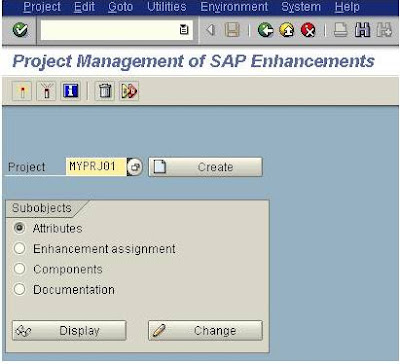
Implementation of SAP User Exits and Customer Exits Implementing exits in SAP ABAP in SAP standard applications ,is important for every SAP developer.when we are working on implementation or support projects.user and customer exits are old enhancement techniques ,are used to enhance the standard functionality.So in the previous post,we have learnt the How to find user exits and customer exits after finding user exits/customer exits ,we have to implement the that finding exits.we will find the user exits through the SMOD Transaction code and we will implement the Exits using CMOD Transaction code. Once we find the user exits, We go to CMOD. The purpose of the CMOD is to register what we are going to do in the particular enhancement. So, at the time of up gradation it will be easy to retain the code. click on Create. Now in the next screen  click on Save and then on “Enhancement assignments Now enter your enhancement name, click on Save and then on “Components” ...

How to Find SAP User Exits and Customer Exits

Image
How to Find SAP User Exits and Customer Exits User Exits and Customer Exits are old enhancement types  which are available in the form of Subroutines and Function modules using which we can add our own functionality to SAP standard applications without having to modify the original applications ,present ,instead of which ,there is available advanced BADI's and Implicit and Explicit Enhancement Options .In the previous lessons ,we have learnt How to find BADI and How to implement BADI . What are User Exits and Customer Exits User exits These are implemented in the form of subroutines so which also known as FORM EXITs. The user exits are normally collected in includes and attached to the standard program by the SAP. All User exits start with the prefix word USEREXIT_... FORM USEREXIT_XXXX.... INCLUDE ZZUSEREXIT....... ENDFORM.    Customer exits SAP having  customer exits for specific programs, screens, and menus within standard appli...

Implementing SAP BADI

Image
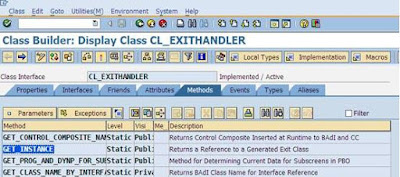
Implementing SAP BADI Implementation of BADI in SAP ABAP is neither easy nor difficult but if you have some experience to find the appropriate method of BADI. Then you can simply implement the BADI ,Finding a BADI is somewhat difficult ,we have to find right parameters that are import and export parameters of BADI method .for that there are three methods to find a BADI . Here , i am creating  BADI implementation for CS01 transaction, that does not allow user to create alternative BOMs for already created BOM. Now let us learn the how to implement BADI. Step1: Keep a break point in “CALL METHOD cl_exithandler=>get_class_name_by_interface” line inside the get_instance method of the class cl_exithandler in Class builder (SE24). Step2: Now execute CS01 transaction, you will see the debugger that you set in SE24 transaction. Double click on the changing parameter “EXIT_NAME”. Press F8 sequentially and make a note of the exit names. ...

How to Find a BADI

Image
How to Find a BADI in SAP ABAP BADIs are 'Business Add-In's which is an advanced SAP Object Oriented enhancement technique to add our own business requirement to the existing SAP standard applications. It is advanced to user exit and customer exits.BADIs have existed in SAP R/3 since the system release 4.6 version of SAP. What is BADI What is the use of BADI other than old enhancement techniques, the main use of BADI is, an object-oriented approach to making them reusable that is one BADI can be used any number of times where whereas standard enhancement techniques can be used only once.  There are two important transactions available to define the BADI Which are SE18 and SE19. When we create a BAdI definition in SE18, the class interface will be automatically created and we can define our methods in the interface. The implementation of the methods can be done in SE19 transactions. We can implement the BADI in SE19.  BADI interface created with 'IF_EX...

Enhancements Types in SAP ABAP

Enhancement is like a plug-in that can be used as enhancing function for already developed SAP applications. Enhancements Types in SAP ABAP and Enhancements Techniques User-Exits and Customer Exits Since beginning, User-Exits and customer exits are used as enhancement techniques. User exits are available in the form of subroutines which we called as form routines and customer-exits are available in the form of function modules as a source for user code. These are working like hooks. This function module has a defined interface and has an include program. SAP user would add his functionality in this include program and activate it.  Problem with user exits is that only a single implementation is possible. That means if an enhancement is included in a project that cannot be reused as long as the project is active.  Badi's Instead of old techniques, present we are using Badi’s which supports multiple implementations. Now several users could create ins...