Posts

Different Types of SAP ABAP Select Statements

Different Types of SAP ABAP Select Statements As a SAP ABAP Consultant ,Our main role is fetching data using Select Statement and displaying it in output for End user .So Here i shared Different types of Select statements and their definitions and syntaxes and example programs. SELECT is a keyword used in SAP ABAP programming. SELECT Statement Syntax: SELECT result [target] FROM source [where] [GROUP BY fields] [ORDER BY order]. Select Retrieves or extract and/or a set of data from a database table or view (see Relational database ). SELECT belongs to the OPEN SQL command set. Each SELECT command consists of a series of clauses specifying different tasks: The result table might be a table or a single record, The INTO target clause defines the target place into which the selected data is to be retrived. If the target area is an internal table, the INTO clause specifies The INTO clause specify the result table that may be work area or internal table in which fetc...
SAP Important Modules Tables List and Links between SAP Tables

SAP Important Modules Tables List and Links between SAP Tables Here i Have shared Important SAP modules tables list and relations between them and table name and its description and fields names and their description .This is useful for ABAP learning students . Table Key Link Key One-to-One One-to-Many One One One Many SAP Table Name (Table Description) SAP Field Name (Field Description) Useful Fields SAP Table Information SAP Field Name (Field Description) SAP Table Name (Table Description) Transparent Table Cluster Table Master Data Tables CEPC = Profit Center Master Data Table CSKS = Cost Center Master KNA1 = Cutomer Master (General Data) LFA1 = Vendor Master (General Data) MARA = Material Master (General Data) SKB1 = G/L Account Master (Company Code) T001W = Plants/Branches T001 = Company Codes SAP - FI/CO Financial Accounting Special Purpose Ledger Controlling Accounts Payable General Ledger Accounts Receivable Reconcillation Ledger Cu...

How to Debug Smartforms in SAP ABAP

Image
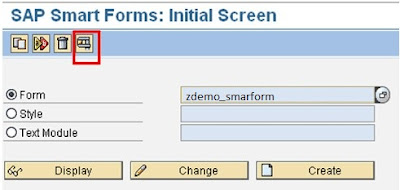
How to Debug Smartforms in SAP ABAP Debugging smartforms in SAP ABAP is important task for every ABAP developer and also so many candidates do not how to debug smartform .To avoid this difficulty ,i am sharing here step by step tutorial on debugging smartfrom.This article helpful for Fresher ABAP developers. Step by step process to debug smartforms First of all ,go to SMARTFORMS Transaction code and enter your form name and press on Execute button. After executing function module ,it will generate the function module and click on display function module. Then press the source code function module and click on Perform GLOBAL_INIT subroutine. Then enter breack point wherever you want and execute it and it will take you to debugging mode. We have succesfully learnt ,How to Debug Smartforms in SAP ABAP. How to learn SAP ABAP   Smartforms     SAP Scripts and Smart forms     Smartforms Interview Questions     How to debug ...

How to Start Learning SAP ABAP Course as a Fresher Candidate

Image
How to Start Learning SAP ABAP Course as a Fresher Candidate Here, I am sharing my SAP ABAP Tutorials which will teach you How to start the SAP ABAP Course and Learn ABAP Language as a Fresher Along with these Tutorials, shared SAP ABAP Real Time Interview Questions and answers which are useful for freshers and experienced. What is SAP ABAP? ABAP is an Advanced Business Application Programming.ABAP is a 4th Generation Language and Database independent. SAP ABAP can be executed on any Database. ABAP is used for developing SAP R/3 Applications. R/3 means 3 Tier Architecture : Presentation Server Application Server Database Server ABAP  Programming is executed in the Application Server Level. We are developing all SAP ABAP Programming applications in the ABAP/4 Development Work Bench. As a fresher candidate, you don't know, where to take training and how to start learning SAP ABAP Course. Don't worry, I am here to help you to guide you, how to learn SAP...

What is For All Entries Statement in SAP ABAP

Image
What is For All Entries Statement in SAP ABAP When we fetch the data from multiple tables, SELECT FOR ALL ENTRIES is the best alternative for SELECT WITH JOINS in SAP ABAP. It reduces the database load. For All Entries Syntax: SELECT <Fields>  From <DT> into table <Itab2> FOR ALL ENTRIES IN <itab1> WHERE <KF> = <ITAB>-<KF>.  'FOR ALL ENTRIES' is the addition of a select statement. It allows comparing header(parent) internal table When selecting the item(child) data with internal table-filed in the where condition. Then Data is retrieved from the item table equal based on the where condition internal table key field. What is For All Entries Statement in SAP ABAP WHERE - FOR ALL ENTRIES Syntax ... FOR ALL ENTRIES IN itab WHERE ... col operator itab-filed ... What is for all entries statement? The entire Select statement is checked for each individual row of the internal table. The result data of the SELECT sta...

SAP Real time Interview Questions[SAP ABAP iq]

ALL SAP ABAP Real time Interview Questions[SAP ABAP iq] These are the most important and useful SAP ABAP real-time interview questions and answers helpful for SAP ABAP freshers and experienced SAP technical consultants. Real-Time Interview Questions of all ABAP programming Objects(Applications) : SAP Data Dictionary Real time Interview Questions SAP BDC Real time Interview Questions SAP ALV Reports  Real time Interview Questions Module Pool Interview Questions SAP Smartforms Real time Interview Questions SAP BADI Real time Interview Questions SAP BAPI Real time Interview Questions SAP  IDOC Real time Interview Questions ABAP Check and Value Table Questions SAP SD MM FICO Flow Interview Questions SAP OOPs Real time Interview Questions SAP OOPs Part One  Real time Interview Questions SAP OOPs Part two Real time Interview Questions SAP OOPs Part three Real time Interview Questions S...

BADI Interview Questions in SAP ABAP

BADI Interview Questions in SAP ABAP A BAdI is an object-oriented enhancement option, which makes it the most sophisticated enhancement type. The main characteristic of a BAdI is that it provides a mechanism to change the functionality of a well-defined business function without making changes to the delivered source code. Future upgrades of the original business function can be applied without losing the customer-specific enhancements or the need to merge the changes.  If you want to become a professional and technical blogger practically, read these real-world practical SAP ABAP books . These books will help you to become a more flexible coding developer in future SAP technology. What is a BADI in SAP? BADI (Business Add-In) is a new SAP Object Oriented enhancement technique that is used to add our own business functionality to the existing SAP standard functionality.  BADI follows the Object-Oriented approach to make them reusable. A BADI can be used any number ...